
Bask reads compatible Bluetooth sensors and shows whether each enclosure is in range—on any screen in your home.
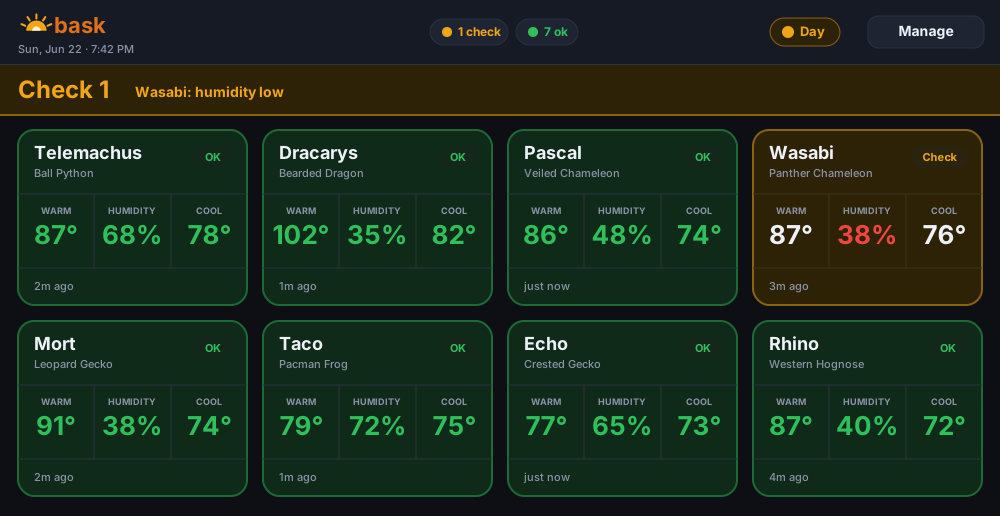
Bask turns compatible Govee sensors into a dashboard you can read from across the room.
See “all good” when readings are in range, or a direct alert naming the enclosure and problem.
Set warm-side, cool-side, and humidity targets for each species. Built-in presets are editable starting points.
Switch target ranges automatically with your lighting schedule.
Reads supported Govee broadcasts without pairing, a Govee account, or wires across the room.
Know when a sensor battery is low or a reading has gone stale.
Send a notification when an enclosure needs attention, using the provider you choose.
Add Bask to a phone or tablet for a full-screen app experience. No app store required.
Core monitoring runs on your own hardware with no Animal Room account. Optional integrations connect only when you enable them.
No soldering or custom wiring.
Use a supported 64-bit model running Raspberry Pi OS. A Pi Zero 2 W can run Bask alone; choose at least 2 GB if you may add Shed.
One small thermo-hygrometer in each enclosure you want to watch. Affordable and widely available.
View it on your phone, a tablet, an old monitor, or a smart display — anything with a web browser on your Wi-Fi.
Start Raspberry Pi OS, run one installer command, then add your sensors.
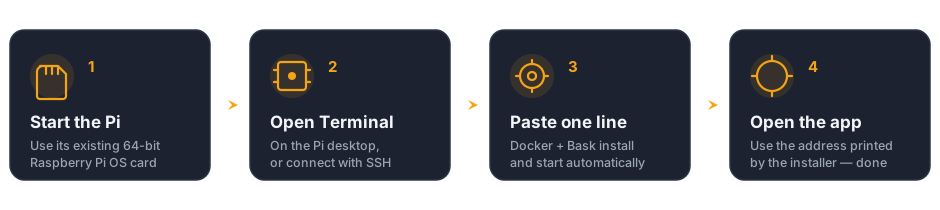
Use the working OS card that came with your Pi, or install Raspberry Pi OS (64-bit) with Raspberry Pi Imager. Connect the Pi to your home network.
Use Terminal directly on the Pi desktop, or enable SSH and connect from another computer. No Linux or Docker knowledge is needed.
The installer prepares Docker and Bluetooth, downloads Bask, and sets it to start automatically. Nothing is compiled on the Pi.
Open the numeric address printed by the installer, such as http://192.168.1.50:8080. Tap ⚙ Manage → Pair by proximity, hold a Govee sensor near the Pi, and assign it to an enclosure.
A .local name is also provided, but it does not work on every device. Use the numeric address if it will not load.
curl -fsSL https://animalroom.app/bask/install.sh | bash
Run the same command later to update Bask without replacing your settings or sensor history.
Want care schedules too? Choose Haven in the Haven installer to set up Bask + Shed and automatically connect their combined room dashboard.
Yes. Bask is open source under the MIT license, with no subscription or paid features. Optional tips support testing and development.
No. Start Raspberry Pi OS, open Terminal, and paste one line. The installer handles Docker, Bluetooth, persistent storage, and automatic startup. The beginner guide explains both the on-screen and remote-SSH routes.
Bask works for any keeper using Govee H5075 sensors. It ships with starting temperature and humidity ranges for several common reptiles, and you can adjust every number to match your species and your room. It’s a monitoring aid, not veterinary advice — always verify against trusted care resources.
Yes. Sensor readings, enclosure settings, and history stay on your own Raspberry Pi. Core monitoring needs no account or cloud. Optional integrations such as ntfy alerts or Cielo room climate contact only the service you choose to connect.
Run the same one-line installer again. It downloads the current prebuilt image and restarts Bask on it, without replacing your settings or history. Nothing is compiled on your Pi, so an update is a download rather than a long rebuild. The Settings screen also provides a portable backup download.
Use the numeric address printed by the installer, such as http://192.168.1.50:8080. A .local address does not work on every device. Low memory can also stop an app from starting.
Run curl -fsSL https://animalroom.app/doctor.sh | bash for a read-only diagnostic report. It excludes records, passwords, access codes, and secret values.
Yes. Open it on a cheap wall-mounted tablet, an old phone, a monitor, or a smart display like an Amazon Echo Show — anything with a web browser on your network.